
Honeywell Cool Mist Humidifier Instructions: A Comprehensive Guide
Welcome! This guide provides essential instructions for optimal humidifier performance, covering setup, operation, cleaning, and troubleshooting for various Honeywell models.
Important: Always retain this manual for future reference, noting the serial number for warranty and replacement parts assistance.
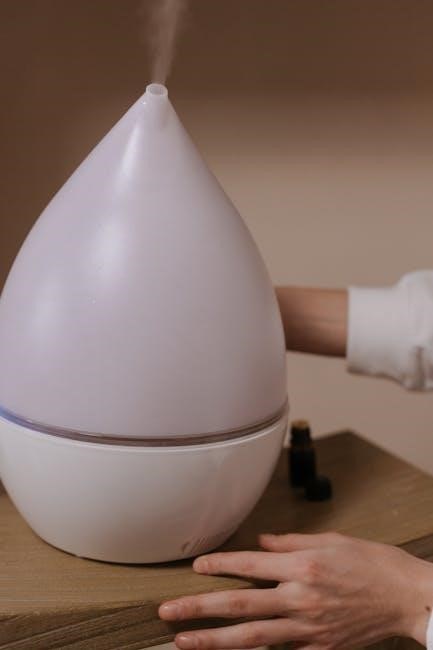
Understanding Your Honeywell Humidifier
Honeywell cool mist humidifiers enhance indoor air quality by adding moisture, alleviating dryness, and easing symptoms of colds and allergies. These models utilize various technologies, including ultrasonic and evaporative methods, to disperse a fine, cool mist.
Understanding your specific model – whether it’s a top-fill, UV germ-free, or console style – is crucial. Each Honeywell humidifier is designed for different room sizes and offers unique features like adjustable mist levels and night lights.
Proper operation involves regular filter changes (HAC-504AW, etc.) and diligent cleaning to prevent mold and bacteria growth. Refer to the instruction manual for detailed guidance on maximizing your humidifier’s benefits and ensuring its longevity.
Safety Instructions & Precautions
Important Safety Instructions: Always read and save these instructions before operating your Honeywell humidifier. Electrical appliances require careful handling; avoid using with damaged cords or outlets. Never operate if the humidifier has been dropped or damaged.

To prevent electric shock, do not immerse the unit, cord, or plug in water. Unplug before filling, cleaning, or changing filters. Keep the humidifier out of reach of children, as small parts pose a choking hazard.

Place the humidifier on a water-resistant surface to prevent damage to floors and furniture. Do not use with chemicals or additives, as they can harm the unit and your health.
Unpacking and Initial Setup
Carefully unpack your Honeywell Cool Mist Humidifier and verify all components are present. Retain the packaging for potential future transport or warranty claims. Remove all packaging materials, including any protective films or inserts, from the humidifier and its parts.
Before initial use, inspect the unit for any visible damage. Place the humidifier on a firm, level, and water-resistant surface. Ensure adequate ventilation around the unit. Keep this instruction manual readily available for future reference. Locate and record the serial number for warranty purposes.
Identifying Humidifier Parts
Your Honeywell Cool Mist Humidifier consists of several key components. The Base houses the internal mechanisms, while the Water Tank provides water storage. Familiarize yourself with the Filter Components, crucial for clean mist output – typically a wicking filter or a UV element.
The Control Panel Overview includes power buttons, mist level settings, and potentially a night light control. Understanding each part’s function is vital for proper operation and maintenance. Refer to diagrams within this manual for visual identification of each component.
Base and Water Tank

The Base of your Honeywell Humidifier is the foundational unit, containing the motor and other operational components. Ensure it’s placed on a water-resistant surface to prevent damage. The Water Tank, typically removable, holds the water supply for humidification.
Carefully inspect both parts for cracks or damage before each use. Proper alignment between the Base and Water Tank is essential to prevent leaks. Regularly clean both components as outlined in the ‘Cleaning and Maintenance’ section to maintain optimal performance and hygiene.
Filter Components
Honeywell Cool Mist Humidifiers utilize filter components to purify the water and enhance mist quality. These filters, like the HAC-504AW (Type A), remove minerals and impurities, preventing white dust and promoting cleaner air.
The filter’s lifespan is crucial for performance; regular replacement is necessary. Inspect the filter for discoloration or buildup. A clogged filter reduces mist output and can harbor bacteria. Proper filter maintenance ensures efficient humidification and a healthier indoor environment. Always refer to the ‘Replacing the Filter’ section for detailed instructions.
Control Panel Overview
Honeywell humidifier control panels vary by model, but generally feature intuitive settings. Common elements include a Power On/Off button, Mist Level controls (Low, Medium, High), and potentially a Night Light function. Some models offer digital displays showing humidity levels or timer settings.
Familiarize yourself with each button’s function; The Mini Mist/Ultra Comfort models may have unique controls. Refer to your specific model’s diagram within this manual for precise button locations and descriptions. Understanding the control panel ensures optimal operation and customization of your humidification experience.

Filling the Water Tank
Before filling, ensure the humidifier is powered off and unplugged. Remove the water tank from the base. Most Honeywell cool mist humidifiers feature a top-fill design for convenient access. Fill the tank with cool, distilled water to avoid mineral buildup and prolong filter life. Avoid using hot water or additives.
Do not overfill beyond the indicated maximum fill line. Securely replace the tank onto the base, ensuring a proper seal. Water resistant surfaces are crucial, as leaks can occur. Regularly check for leaks after filling and during operation to prevent damage.
Replacing the Filter
Regular filter replacement is vital for maintaining optimal performance and air quality. Honeywell offers various filter types, including HAC-504AW (Type A), designed for specific models. A clogged filter reduces mist output and can harbor bacteria.
Filter replacement frequency depends on usage and water quality, but generally, replace every 1-3 months. Remove the old filter from the base after unplugging the humidifier. Rinse the filter compartment to remove any debris. Insert the new filter, ensuring it’s properly seated. Consistent filter changes guarantee clean, healthy mist.
Filter Types (HAC-504AW, etc.)

Honeywell humidifiers utilize different filter types, tailored to specific models for optimal performance. The HAC-504AW (Filter A) is a common wicking filter, ideal for many cool moisture models like the HEV355 series. Other options include antimicrobial filters, designed to inhibit bacterial growth within the humidifier.
Filter selection is crucial; always check your humidifier’s model number to ensure compatibility. Using the incorrect filter can reduce efficiency and potentially damage the unit. Genuine Honeywell filters are recommended for consistent quality and performance, guaranteeing clean and healthy mist output.
Filter Replacement Frequency
Regular filter replacement is vital for maintaining humidifier performance and air quality. Honeywell generally recommends replacing filters every 3-6 months with typical use. However, this timeframe can vary based on water quality and humidifier usage frequency.
If you notice reduced mist output, unpleasant odors, or visible buildup on the filter, it’s time for a replacement. More frequent changes may be necessary if using hard water. Ignoring filter replacement can lead to bacterial growth and reduced humidification effectiveness. Always refer to your model’s specific instructions.
Operating Your Humidifier
Powering on your Honeywell humidifier is typically achieved with a simple button press. Most models feature adjustable mist level settings – low, medium, and high – allowing you to customize output based on room size and desired humidity.

Explore the control panel to understand these options. Some units include a convenient night light functionality, providing a soft glow for nighttime use. Ensure the water tank is adequately filled before operation. Regularly monitor the water level and refill as needed for continuous, efficient humidification.
Powering On/Off
To power on your Honeywell cool mist humidifier, locate the power button on the control panel and press it firmly. A light indicator will typically illuminate, confirming activation. To power off, simply press the power button again. Ensure the humidifier is unplugged from the electrical outlet when not in use or during extended periods of inactivity.
Some models may feature an auto-reset function after a power outage, while others require manual restarting. Always check the specific instructions for your model. Prior to powering on, confirm the water tank is properly filled and the filter is correctly installed.
Mist Level Settings
Honeywell humidifiers offer adjustable mist level settings to customize output based on room size and personal preference. Typically, controls include Low, Medium, and High settings. Low provides a gentle mist for smaller spaces or nighttime use, while High delivers maximum moisture for larger rooms.
Experiment with different settings to achieve desired humidity levels. Some models feature a ‘Mini Mist’ or ‘Ultra Comfort’ setting for even finer mist control. Monitor room humidity with a hygrometer to prevent over-humidification. Adjust settings as needed to maintain comfortable and healthy air quality.
Night Light Functionality (if applicable)
Certain Honeywell cool mist humidifier models include a convenient night light feature. This soft glow provides a comforting illumination in darkened rooms, ideal for bedrooms or nurseries. The night light is typically activated via a dedicated button on the control panel.
Some units offer adjustable brightness levels, allowing you to customize the intensity of the light. This feature can be particularly useful for children or individuals sensitive to darkness. Remember to check your specific model’s instruction manual to confirm night light availability and operation.
Cleaning and Maintenance
Regular cleaning is crucial for maintaining optimal performance and preventing bacterial growth. Daily, empty and dry the water tank to inhibit mildew. Weekly, thoroughly clean the tank and base with a mild detergent and rinse completely.
Monthly, or as needed, descale the humidifier to remove mineral buildup using a descaling solution or diluted white vinegar. Always follow the manufacturer’s instructions for descaling. A clean filter is also vital; replace it as recommended. Proper maintenance extends the life of your Honeywell humidifier and ensures healthy air quality.
Daily Cleaning Procedures
Each day, after use, unplug your Honeywell Cool Mist Humidifier. Empty any remaining water from the tank and base to prevent bacterial growth and mineral buildup. Rinse the tank thoroughly with clean water, ensuring no residue remains.

Wipe down the exterior surfaces with a damp cloth. Allow all parts to air dry completely before reassembling. This simple routine significantly reduces the need for more intensive cleaning later. Consistent daily care ensures hygienic operation and prolongs the humidifier’s lifespan, delivering consistently fresh moisture.
Deep Cleaning (Weekly/Monthly)
Weekly or monthly, depending on usage, perform a more thorough cleaning. Disassemble the humidifier, including the tank, base, and any removable parts. Wash these components with a mild dish soap and warm water, using a soft brush to remove scale or buildup.
Pay close attention to areas prone to mineral deposits. Rinse thoroughly to eliminate all soap residue. For stubborn buildup, a diluted vinegar solution can be used, followed by a thorough rinse. Ensure all parts are completely dry before reassembly, preventing mold and maintaining optimal performance.
Descaling the Humidifier
Mineral buildup, or scale, can reduce your humidifier’s efficiency. To descale, unplug the unit and empty any remaining water. Fill the tank with equal parts white vinegar and water. Allow this solution to sit for at least 30 minutes, or longer for heavy buildup, ensuring it reaches all internal surfaces.
After soaking, empty the tank and rinse thoroughly with clean water multiple times until the vinegar smell is gone. This process removes mineral deposits, restoring optimal mist output and prolonging the humidifier’s lifespan. Repeat as needed.
Troubleshooting Common Issues
No Mist Output? Ensure the humidifier is properly filled with water and the filter is correctly installed and not clogged. Check the mist level setting; it may be set to low. Humidifier Noisy? Verify the unit is on a level surface. Vibrations can occur if it’s unstable. A rattling sound might indicate loose parts—inspect carefully.
Water Leaks? Confirm the tank is securely seated on the base. Inspect the tank for cracks or damage. Ensure the drain plug (if applicable) is tightly closed. If issues persist, consult the warranty information or contact Honeywell support.
No Mist Output
Troubleshooting Steps: First, confirm the water tank is adequately filled to the maximum fill line. Next, verify the filter is correctly installed; a poorly seated filter prevents mist production. Inspect the filter itself – a clogged filter restricts airflow and stops mist. Ensure the mist control is not set to the ‘off’ position or the lowest setting.
Further Checks: Check for mineral buildup, which can obstruct the misting mechanism. If the problem continues, try a different power outlet. If none of these steps resolve the issue, consider a filter replacement.
Humidifier is Noisy
Addressing Noise Concerns: Some operational sounds are normal, particularly a gentle bubbling or fan noise. However, excessive noise requires investigation. Ensure the humidifier is placed on a level, stable surface to minimize vibrations. Check for obstructions within the base or fan area that might cause rattling.
Potential Issues: A low water level can sometimes create gurgling sounds. Verify the water tank is sufficiently filled. If the noise persists, the fan motor might require inspection or the unit may need professional servicing. A dirty filter can also contribute to increased noise levels.
Water Leaks
Addressing Water Leaks: Discovering leaks requires immediate attention to prevent damage. First, ensure the water tank is correctly seated and properly aligned with the base. Inspect the tank for cracks or damage; replace if necessary. Check the fill opening for a secure seal.

Troubleshooting Steps: Verify the humidifier is placed on a water-resistant surface. Overfilling the tank can also cause leaks. If leaks continue, examine the internal tubing and connections for any signs of wear or detachment. A damaged or improperly installed filter can sometimes contribute to leakage issues.
Using Honeywell Humidifier in Different Room Sizes
Room Size Considerations: Honeywell humidifiers cater to various spaces. Smaller models are ideal for bedrooms, while larger capacity units suit living rooms or multiple rooms. Consider the square footage when selecting a humidifier; larger rooms require higher output.
Optimizing Performance: For optimal humidity, position the humidifier centrally within the room. Avoid placing it directly next to furniture or walls, which can restrict airflow. Experiment with mist level settings to achieve desired humidity. Some models, like the Top Fill, are particularly effective for larger areas.
Germ-Free Technology (UV Models)
UV Germ Reduction: Select Honeywell models feature integrated UV technology designed to help reduce bacteria and germs in the water. This innovative system utilizes ultraviolet light to inhibit microbial growth, providing cleaner mist output.
Maintenance of UV Function: While UV technology aids in cleanliness, regular cleaning remains crucial. Ensure the water tank and components are thoroughly cleaned as instructed. The UV lamp typically has a long lifespan, but refer to your model’s specifics for replacement guidelines. This feature enhances the overall hygiene of your humidifier.
Warranty Information
Limited Warranty: Your Honeywell Cool Mist Humidifier is protected by a limited warranty against defects in materials and workmanship. The warranty period typically begins from the date of purchase. Please retain your proof of purchase for warranty claims.
Coverage Details: The warranty generally covers product repair or replacement at Honeywell’s discretion. It does not cover damage resulting from misuse, accidents, or unauthorized repairs. For specific warranty terms, duration, and claim procedures, please visit the official Honeywell website or contact their customer support.
Finding Replacement Parts
Genuine Honeywell Parts: To maintain your humidifier’s performance and warranty validity, use only genuine Honeywell replacement parts. Key components like filters (HAC-504AW, etc.) and potentially the water tank are available for purchase.
Where to Buy: Replacement parts can be found at major retailers, online marketplaces (like Amazon), and directly through the Honeywell website. When ordering filters, ensure compatibility with your specific humidifier model. Always reference your humidifier’s model number when searching for parts to guarantee a proper fit and function.
Storing Your Humidifier
Preparation is Key: Before storing your Honeywell cool mist humidifier for an extended period, thorough cleaning is crucial. Completely empty the water tank, and meticulously clean all components, including the base and filter area, to prevent mold and bacterial growth.
Proper Storage: Store the humidifier in a cool, dry location, away from direct sunlight. Keep it in its original packaging, if possible, to protect it from dust and damage. Ensure the unit is completely dry before storage to avoid mildew. Periodically check the stored humidifier for any signs of deterioration.
Serial Number Location & Recording
Locating Your Serial Number: Your Honeywell humidifier’s serial number is vital for warranty claims, replacement parts orders, and customer support. Typically, it’s found on a sticker located on the bottom of the humidifier base. It may also be printed on the original packaging or within the instruction manual.
Record Keeping: Immediately upon unpacking, carefully locate and record the serial number in a safe and accessible place. This could be your original purchase receipt, a dedicated home appliance record book, or a secure digital document. Having this information readily available will streamline any future service requests.